Trang

Thứ Tư, 1 tháng 5, 2013

TEXT OPENING SEQUENCE WITH CSS ANIMATIONS


Today I want to show you how to create a fun little typography effect with CSS animations and text shadows. Maybe you know those eerie opening sequences of movie trailers where some text is being faded in on a dark background. After seeing Introducting Briefs (which is not a terror movie trailer but a preview for an interesting app) I got inspired for recreating the effect using CSS.

Thứ Sáu, 26 tháng 4, 2013

SIMPLE YOUTUBE MENU EFFECT


Today we’ll show you how to recreate the little menu effect that you can see in the left side-menu on YouTube when watching a video (where it says “Guide”). The menu is made of a little menu icon, a label and a list of menu items that appears when the label or menu icon is clicked. Once it’s clicked the menu icon slides to the right and the label moves up while the list items fade in sequentially. We’ll add some more style and effects to it in order to make it a bit more interesting.
So, let’s do it!

THE MARKUP
For the HTML we will use a nav element and inside we’ll add a div that will contain the menu icon and the label. We’ll use an unordered list for the menu items:

Each menu item will have a little icon, so we’ll give them all different classes for that. The icons that we’ll be using are from IcoMoon and we’ve created a custom icon set with their brilliant app.
Let’s take a look at the CSS.
DEMO

SOURCE

Chủ Nhật, 21 tháng 4, 2013

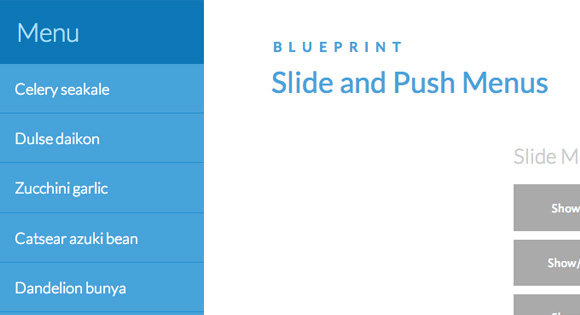
SLIDE AND PUSH MENUS


A set of fixed menus that will slide out from any of the edges of the page. The two menus that slide out from the left and right side can also be used in combination with the body moving to the left or right side, respectively, hence being “pushed”. There are examples of how to trigger the opening and closing of the menus and some example media queries.

DEMO

SOURCES

Thứ Tư, 17 tháng 4, 2013

HOW TO CREATE A SIMPLE MULTI-ITEM SLIDER


For today’s tutorial we want to show you how to create a simple item slider with CSS animations and some jQuery. The idea was inspired by the Aplle product slider where several little items fly in with a bouncing animation

HEXAFLIP: A FLEXIBLE 3D CUBE PLUGIN


Today I’d like to share my process for creating a flexible JavaScript UI plugin I’ve dubbed HexaFlip.
Lately I’ve taken to building simple experimental UI plugins that manipulate elements with a combination of JavaScript and modern CSS techniques (e.g. oriDomi and Maskew). As Codrops is known for featuring some progressive techniques in browser-based UI design, HexaFlip should fit in nicely.
I originally developed a simpler version of HexaFlip for an iPhone app I built called ChainCal where it served as a time-picker interface for setting alarms. Most mobile time-picker widgets are fashioned after a dial, but I reasoned that rotating cubes would serve for a more unique and memorable experience. As we all know, a cube has six (i.e. “hexa”) faces, but when rotating it around a single axis, we only have four to work with (front, top, back, and bottom). Thus if we built a cube interface using CSS alone, our interface would be limited to four options per choice. HexaFlip solves this issue and playfully challenges the user’s expectations by allowing the cube to cycle over a list of any length.
Source Code

Thứ Sáu, 26 tháng 12, 2008

Giáng Sinh 2008

Một mùa đông nữa lại đến roài, mùa đông măn nay có lạnh lắm không nhỉ?
Giáng sinh - năm nào cũng thế : buồn, chán ... Khi nào mình có thể thực sự vui vẻ nhỉ chẳng ai có thể biết trước cuộc sống tiếp diễn như thế nào (có lẽ cũng hay!)
Hết một năm nữa mà mình chẳng làm được ji cả, cũng chẳng nhận đc ji cả hic, chẳng thấy ông già Noel đến( mặc dù đã để mấy đôi tất ở cuối giường).
Thực sự thì mình lại muốn đi tặng quà cơ nhưng chả có ai mà tặng cả buồn..sao lại như vậy nhỉ, nhìn dòng người qua lại mà mình càng cảm thấy hiu quạnh: gia đình? bạn bè? bạn gái? +thêm tiền nữa? chẳng có gì cả......Sao tôi khổ thế này

Thứ Sáu, 5 tháng 12, 2008

ID và Class trong CSS

Sự khác biệt giữa ID và Class

Về cơ bản có thể nói 2 thẻ ID (#) và Class (.) đều mang thuộc tính giống nhau, nhưng sự khác biệt nằm ở chỗ với thẻ ID (div) được gán cho một div thì div đó là duy nhất trong file (X)HTML. Không bao giờ được phép có 2 thẻ ID trùng tên. Trong khi đó Class thì lại được gán cho mọi đối tượng có cùng lớp (class), các đối tượng có cùng class sẽ chịu sự điều khiển của CSS cho Class đó. Trong bài viết này ta sẽ tìm hiểu tại sao và những nơi nào thì dùng ID hay Class.

Trước tiên ta hãy xem qua cách sử dụng hai thẻ ID và Class trong một đoạn (X)HTML.

id="container">
container là tên được gán cho ID và nó chứa toàn bộ các thành phần của một trang web

class="module">
module là tên được gán cho Class và nó sẽ được sử dụng lặp lại nhiều lần trên một trang web

Qua hai đoạn (X)HTML chúng ta có thể dễ dàng nhận thấy ID được sử dụng cho các thành phần mang tính tuyệt đối và duy nhất trong toàn bộ trang web, và nó thường được gán cho heading, container, leftcol, rightcol, content-warpper, footer ...

Còn với Class sẽ được gán cho các thành phần sẽ lặp lại nhiều lần như Module, Module H3, Content title, readon, ul li ... bởi khi gán Class cho nhiều thành phần của trang web thì bạn chỉ việc khai báo style trên file CSS cho các thành phần này một lần duy nhất.

Chúng ta hãy xem cách khai báo thuộc tính cho ID và Class trong file CSS ở ví dụ sau:

#container{
width: 80%;
margin: auto;
padding: 20px;
border: 1px solid #666;
background: #ffffff;
}

.module{
font-size: small;
color: #008080;
font-weight: bold;
}

Đến bây giờ ta đã có thể nắm bắt được về cơ bản của các thành phần trong một website, cách thể hiện chúng bằng ngôn ngữ HTML và điều khiển chúng theo ý muốn bằng CSS. Trong toàn bộ các bài viết này xin các bạn hãy đọc kỹ, hiểu và thử trực tiếp ngay trên một trang (X)HTML mà bạn tạo ra. Chỉ khi nắm chắc những yếu tố cơ bản thì chúng ta có thể dễ dàng hơn trong các thử nghiệm sau.